

 摘要:
现代C++ JSON库:nlohmann/json 简介与实例 项目概述 nlohmann/json 是一个用现代C++编写的JSON解析和序列化库,由Niels Lohmann开...
摘要:
现代C++ JSON库:nlohmann/json 简介与实例 项目概述 nlohmann/json 是一个用现代C++编写的JSON解析和序列化库,由Niels Lohmann开... 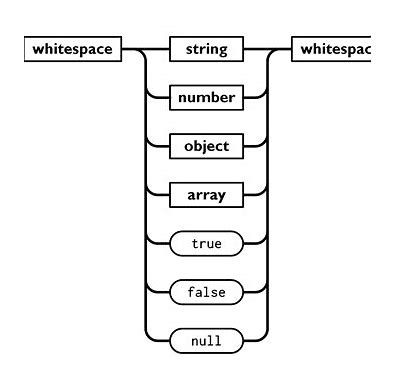
现代C++ JSON库:nlohmann/json 简介与实例
项目概述
nlohmann/json 是一个用现代C++编写的JSON解析和序列化库,由Niels Lohmann开发维护。这个库以其简洁的API设计、出色的性能和易用性而闻名,已成为C++社区中最受欢迎的JSON处理库之一。
主要特性
1. 直观的API设计
text
// 创建JSON对象
json j;
j["name"] = "John";
j["age"] = 30;
j["is_student"] = false;

// 直接访问
std::string name = j["name"];
int age = j["age"];
2. 现代C++支持
- 支持C++11及以上版本
- 使用模板元编程实现类型安全
- 支持移动语义和完美转发
3. 丰富的功能
- JSON解析和序列化
- JSON Schema验证
- JSON Patch和JSON Merge Patch
- 二进制格式支持(BSON、CBOR、MessagePack等)
安装与使用
安装方式
text
# 方法1:单头文件包含
wget https://github.com/nlohmann/json/releases/download/v3.11.2/json.hpp

# 方法2:使用包管理器
# vcpkg
vcpkg install nlohmann-json

# Conan
conan install nlohmann_json/3.11.2
基本使用
text
#include <iostream>
#include "json.hpp"

using json = nlohmann::json;

int main() {
    // 创建JSON对象
    json j = {
        {"name", "Alice"},
        {"age", 25},
        {"hobbies", {"reading", "coding", "hiking"}},
        {"address", {
            {"city", "New York"},
            {"zip", "10001"}
        }}
    };

    // 序列化为字符串
    std::string json_str = j.dump(4); // 参数4表示缩进4个空格
    std::cout << "JSON字符串:\n" << json_str << std::endl;

    // 解析JSON字符串
    json parsed = json::parse(json_str);
    std::cout << "解析后的name: " << parsed["name"] << std::endl;

    return 0;
}
实用示例
示例1:配置文件处理
text
#include <iostream>
#include <fstream>
#include "json.hpp"

using json = nlohmann::json;

class ConfigManager {
private:
    json config;

public:
    bool loadConfig(const std::string& filename) {
        try {
            std::ifstream file(filename);
            if (!file.is_open()) {
                return false;
            }
            config = json::parse(file);
            return true;
        } catch (const json::parse_error& e) {
            std::cerr << "解析错误: " << e.what() << std::endl;
            return false;
        }
    }

    void saveConfig(const std::string& filename) {
        std::ofstream file(filename);
        file << config.dump(4);
    }

    template<typename T>
    T getValue(const std::string& key, T defaultValue) {
        return config.value(key, defaultValue);
    }

    template<typename T>
    void setValue(const std::string& key, T value) {
        config[key] = value;
    }
};

int main() {
    ConfigManager manager;

    // 加载配置
    if (manager.loadConfig("config.json")) {
        // 读取配置值
        std::string server = manager.getValue<std::string>("server", "localhost");
        int port = manager.getValue<int>("port", 8080);
        bool debug = manager.getValue<bool>("debug", false);

        std::cout << "服务器: " << server << ":" << port << std::endl;
        std::cout << "调试模式: " << (debug ? "开启" : "关闭") << std::endl;

        // 修改配置
        manager.setValue("port", 9090);
        manager.saveConfig("config_modified.json");
    }

    return 0;
}
示例2:REST API客户端
text
#include <iostream>
#include <curl/curl.h>
#include "json.hpp"

using json = nlohmann::json;

class RestClient {
private:
    static size_t WriteCallback(void* contents, size_t size, size_t nmemb, std::string* s) {
        size_t newLength = size * nmemb;
        try {
            s->append((char*)contents, newLength);
        } catch(std::bad_alloc &e) {
            return 0;
        }
        return newLength;
    }

public:
    json get(const std::string& url) {
        CURL* curl = curl_easy_init();
        std::string response_string;

        if (curl) {
            curl_easy_setopt(curl, CURLOPT_URL, url.c_str());
            curl_easy_setopt(curl, CURLOPT_WRITEFUNCTION, WriteCallback);
            curl_easy_setopt(curl, CURLOPT_WRITEDATA, &response_string);

            CURLcode res = curl_easy_perform(curl);

            if (res != CURLE_OK) {
                std::cerr << "请求失败: " << curl_easy_strerror(res) << std::endl;
                curl_easy_cleanup(curl);
                return json();
            }

            curl_easy_cleanup(curl);

            try {
                return json::parse(response_string);
            } catch (const json::parse_error& e) {
                std::cerr << "JSON解析错误: " << e.what() << std::endl;
                return json();
            }
        }

        return json();
    }
};

int main() {
    RestClient client;

    // 获取GitHub用户信息
    json user_info = client.get("https://api.github.com/users/nlohmann");

    if (!user_info.empty()) {
        std::cout << "GitHub用户信息:" << std::endl;
        std::cout << "用户名: " << user_info["login"] << std::endl;
        std::cout << "姓名: " << user_info["name"] << std::endl;
        std::cout << "仓库数: " << user_info["public_repos"] << std::endl;
        std::cout << "关注者: " << user_info["followers"] << std::endl;
    }

    return 0;
}
示例3:数据序列化与反序列化
text
#include <iostream>
#include <vector>
#include "json.hpp"

using json = nlohmann::json;

// 自定义类型支持
struct Person {
    std::string name;
    int age;
    std::vector<std::string> hobbies;

    // 序列化到JSON
    friend void to_json(json& j, const Person& p) {
        j = json{
            {"name", p.name},
            {"age", p.age},
            {"hobbies", p.hobbies}
        };
    }

    // 从JSON反序列化
    friend void from_json(const json& j, Person& p) {
        j.at("name").get_to(p.name);
        j.at("age").get_to(p.age);
        j.at("hobbies").get_to(p.hobbies);
    }
};

int main() {
    // 创建Person对象
    Person alice{"Alice", 28, {"reading", "swimming", "coding"}};

    // 序列化为JSON
    json j = alice;
    std::cout << "序列化结果:\n" << j.dump(2) << std::endl;

    // 反序列化
    Person bob;
    json bob_json = {
        {"name", "Bob"},
        {"age", 32},
        {"hobbies", {"gaming", "hiking"}}
    };

    bob_json.get_to(bob);

    std::cout << "\n反序列化结果:" << std::endl;
    std::cout << "姓名: " << bob.name << std::endl;
    std::cout << "年龄: " << bob.age << std::endl;
    std::cout << "爱好: ";
    for (const auto& hobby : bob.hobbies) {
        std::cout << hobby << " ";
    }
    std::cout << std::endl;

    return 0;
}
高级功能
JSON Schema验证
text
#include "json.hpp"
using json = nlohmann::json;

int main() {
    // 定义Schema
    json schema = R"({
        "$schema": "http://json-schema.org/draft-07/schema#",
        "type": "object",
        "properties": {
            "name": {"type": "string"},
            "age": {"type": "number", "minimum": 0},
            "email": {"type": "string", "format": "email"}
        },
        "required": ["name", "age"]
    })"_json;

    // 创建验证器
    json_validator validator;
    validator.set_root_schema(schema);

    // 验证数据
    json data = {
        {"name", "John"},
        {"age", 25},
        {"email", "john@example.com"}
    };

    try {
        validator.validate(data);
        std::cout << "数据验证通过!" << std::endl;
    } catch (const std::exception& e) {
        std::cerr << "验证失败: " << e.what() << std::endl;
    }

    return 0;
}
性能优化建议
- 使用移动语义:对于大型JSON对象,使用
std::move避免不必要的拷贝 - 预分配内存:对于已知大小的数组,可以预先分配空间
- 使用二进制格式:对于需要高性能的场景,考虑使用CBOR或MessagePack格式
- 避免频繁解析:重复使用已解析的JSON对象
总结
nlohmann/json库以其优雅的API设计、强大的功能和良好的性能,成为C++开发中处理JSON数据的首选工具。无论是简单的配置管理,还是复杂的API交互,这个库都能提供简洁高效的解决方案。其活跃的社区支持和详细的文档也使得学习和使用变得更加容易。
通过本文的介绍和示例,相信你已经对这个强大的JSON库有了基本的了解。在实际项目中,根据具体需求选择合适的特性和优化策略,可以充分发挥这个库的优势。
json_20260205141842.zip
类型:压缩文件|已下载:0|下载方式:免费下载
立即下载




还没有评论,来说两句吧...